
- 작성자
1. 크롤링 + AI = 자동 리서치
웹사이트에서 정보를 모으고, 분석하고, 정리하는 작업은 시간이 많이 걸립니다. 크롤러가 데이터를 모으고, AI가 분석하는 조합이면 이 과정을 자동화할 수 있습니다.
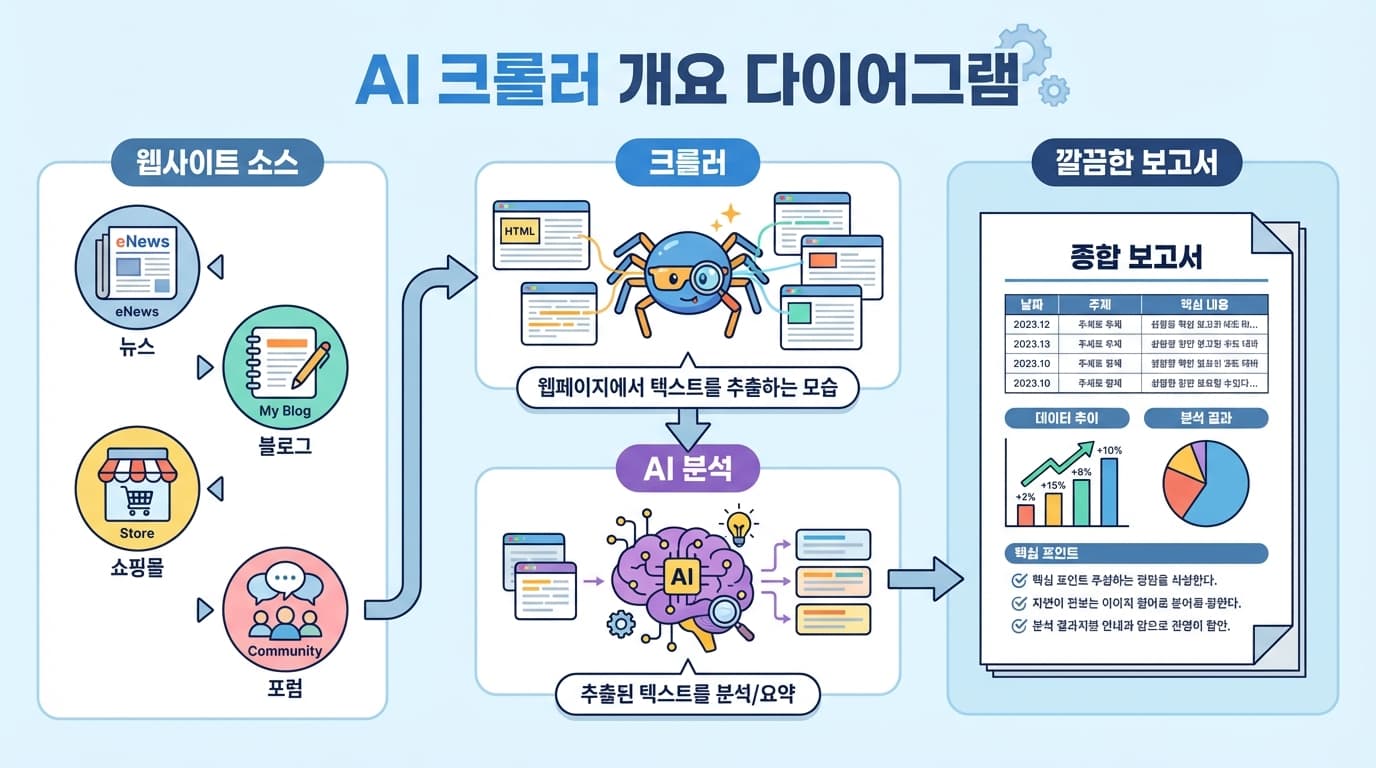
활용 예시:
- 경쟁사 모니터링 — 경쟁사 블로그/SNS 변화 감지
- 가격 비교 — 여러 쇼핑몰 가격을 모아서 비교
- 리뷰 분석 — 고객 리뷰에서 패턴/불만 추출
- 채용 시장 분석 — 구인 공고에서 트렌드 파악
2. 크롤링 도구
2.1 간단한 페이지: fetch + cheerio
import * as cheerio from 'cheerio';

async function scrape(url: string) {
  const res = await fetch(url);
  const html = await res.text();
  const $ = cheerio.load(html);

  // 텍스트 추출
  const title = $('h1').text();
  const content = $('article').text();
  const links = $('a').map((_, el) => $(el).attr('href')).get();

  return { title, content, links };
}
2.2 동적 페이지: Playwright
JavaScript로 렌더링되는 페이지는 브라우저가 필요합니다:
import { chromium } from 'playwright';

async function scrapeWithBrowser(url: string) {
  const browser = await chromium.launch();
  const page = await browser.newPage();
  await page.goto(url, { waitUntil: 'networkidle' });

  const content = await page.textContent('main');
  await browser.close();

  return content;
}
2.3 대량 크롤링: 사이트맵 활용
async function crawlSitemap(sitemapUrl: string) {
  const res = await fetch(sitemapUrl);
  const xml = await res.text();

  // sitemap.xml에서 URL 추출
  const urls = xml.match(/<loc>(.*?)<\/loc>/g)
    ?.map(m => m.replace(/<\/?loc>/g, '')) || [];

  // 각 URL 크롤링 (rate limiting 적용)
  const results = [];
  for (const url of urls) {
    results.push(await scrape(url));
    await sleep(1000); // 1초 간격
  }

  return results;
}
3. AI 분석
크롤링한 데이터를 AI에게 보내서 분석합니다:
3.1 요약 분석
const prompt = `다음은 크롤링한 웹페이지 내용입니다.

핵심 정보를 추출해주세요:
1. 주제/카테고리
2. 핵심 포인트 (3-5개)
3. 중요한 숫자/데이터
4. 관련 키워드

웹페이지 내용:
${crawledContent}`;
3.2 비교 분석
const prompt = `다음은 여러 웹사이트에서 수집한 같은 제품의 정보입니다.

비교표를 만들어주세요:
- 가격
- 주요 스펙
- 장단점
- 추천 대상

수집 데이터:
${JSON.stringify(products, null, 2)}`;
3.3 트렌드 분석
const prompt = `다음은 최근 1주일간 수집한 기술 블로그 글 목록입니다.

트렌드를 분석해주세요:
1. 가장 많이 언급된 기술/키워드 Top 10
2. 새로 등장한 트렌드
3. 사라지고 있는 트렌드
4. 주간 요약 (3-5줄)

수집 데이터:
${articles.map(a => `[${a.date}] ${a.title}: ${a.summary}`).join('\n')}`;
4. 실전 예시: 경쟁사 모니터링
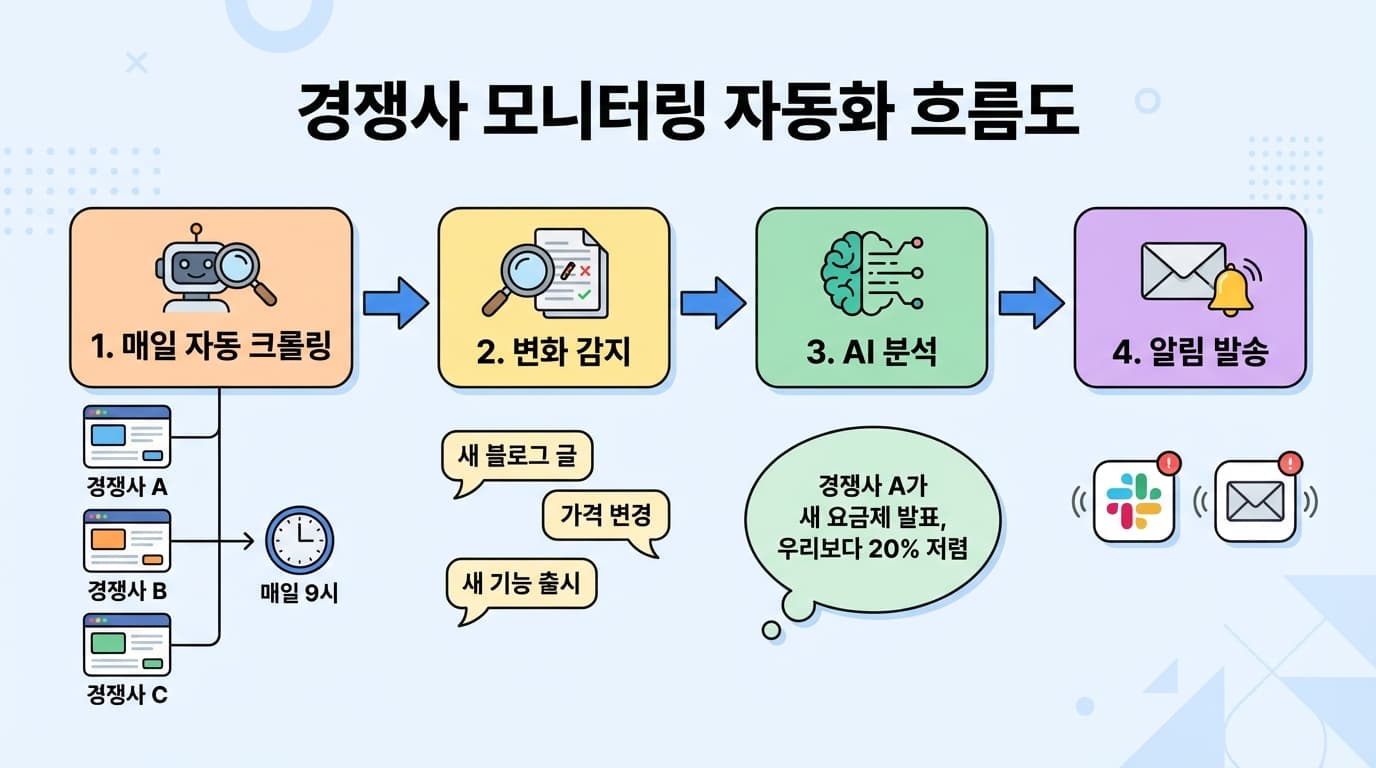
async function monitorCompetitors() {
  const competitors = [
    { name: 'CompanyA', url: 'https://companya.com/blog' },
    { name: 'CompanyB', url: 'https://companyb.com/changelog' },
  ];

  for (const comp of competitors) {
    const current = await scrape(comp.url);
    const previous = loadPrevious(comp.name); // 어제 크롤링 결과

    if (current !== previous) {
      const analysis = await analyzeChanges(previous, current);
      await sendSlackNotification(comp.name, analysis);
      saveCurrent(comp.name, current);
    }
  }
}
5. 주의사항
- robots.txt 확인 — 크롤링이 허용된 페이지만 수집하세요
- Rate limiting — 서버에 부담을 주지 않도록 요청 간격을 둡니다
- 개인정보 — 개인정보가 포함된 데이터는 수집하지 마세요
- 이용약관 — 사이트의 이용약관을 확인하세요
6. 정리
| 단계 | 도구 | 역할 |
|---|---|---|
| 크롤링 | cheerio / Playwright | 웹페이지 텍스트 추출 |
| 분석 | Claude / Gemini API | 요약, 비교, 트렌드 |
| 저장 | 파일/DB | 히스토리 관리 |
| 알림 | Slack / Email | 변화 감지 시 알림 |
크롤러가 데이터를 모으고, AI가 분석합니다. 매일 수동으로 하던 리서치를 자동화할 수 있습니다.