
- Authors
1. Crawling + AI = Automated Research
Gathering information from websites, analyzing it, and organizing it takes a lot of time. Combining a crawler that collects data with AI that analyzes it lets you automate this entire process.
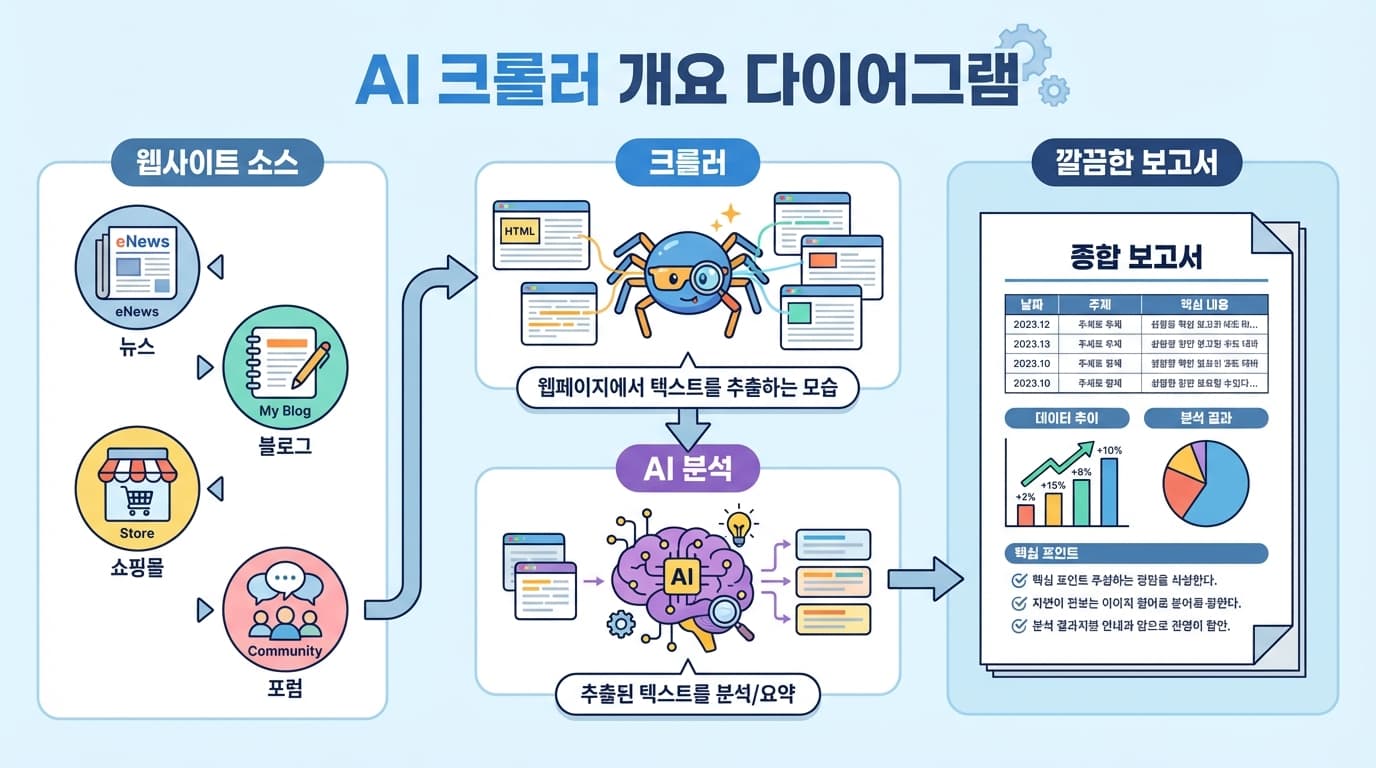
Use cases:
- Competitor monitoring -- Detect changes in competitor blogs/social media
- Price comparison -- Aggregate prices across multiple shopping sites
- Review analysis -- Extract patterns and complaints from customer reviews
- Job market analysis -- Identify trends from job postings
2. Crawling Tools
2.1 Simple Pages: fetch + cheerio
import * as cheerio from 'cheerio';

async function scrape(url: string) {
  const res = await fetch(url);
  const html = await res.text();
  const $ = cheerio.load(html);

  // Extract text
  const title = $('h1').text();
  const content = $('article').text();
  const links = $('a').map((_, el) => $(el).attr('href')).get();

  return { title, content, links };
}
2.2 Dynamic Pages: Playwright
Pages rendered with JavaScript require a browser:
import { chromium } from 'playwright';

async function scrapeWithBrowser(url: string) {
  const browser = await chromium.launch();
  const page = await browser.newPage();
  await page.goto(url, { waitUntil: 'networkidle' });

  const content = await page.textContent('main');
  await browser.close();

  return content;
}
2.3 Large-Scale Crawling: Using Sitemaps
async function crawlSitemap(sitemapUrl: string) {
  const res = await fetch(sitemapUrl);
  const xml = await res.text();

  // Extract URLs from sitemap.xml
  const urls = xml.match(/<loc>(.*?)<\/loc>/g)
    ?.map(m => m.replace(/<\/?loc>/g, '')) || [];

  // Crawl each URL (with rate limiting)
  const results = [];
  for (const url of urls) {
    results.push(await scrape(url));
    await sleep(1000); // 1 second interval
  }

  return results;
}
3. AI Analysis
Send the crawled data to AI for analysis:
3.1 Summary Analysis
const prompt = `The following is content crawled from a web page.

Please extract the key information:
1. Topic/category
2. Key points (3-5)
3. Important numbers/data
4. Related keywords

Web page content:
${crawledContent}`;
3.2 Comparison Analysis
const prompt = `The following is information about the same product collected from multiple websites.

Please create a comparison table:
- Price
- Key specs
- Pros and cons
- Recommended for

Collected data:
${JSON.stringify(products, null, 2)}`;
3.3 Trend Analysis
const prompt = `The following is a list of tech blog posts collected over the past week.

Please analyze the trends:
1. Top 10 most-mentioned technologies/keywords
2. Newly emerging trends
3. Fading trends
4. Weekly summary (3-5 lines)

Collected data:
${articles.map(a => `[${a.date}] ${a.title}: ${a.summary}`).join('\n')}`;
4. Practical Example: Competitor Monitoring
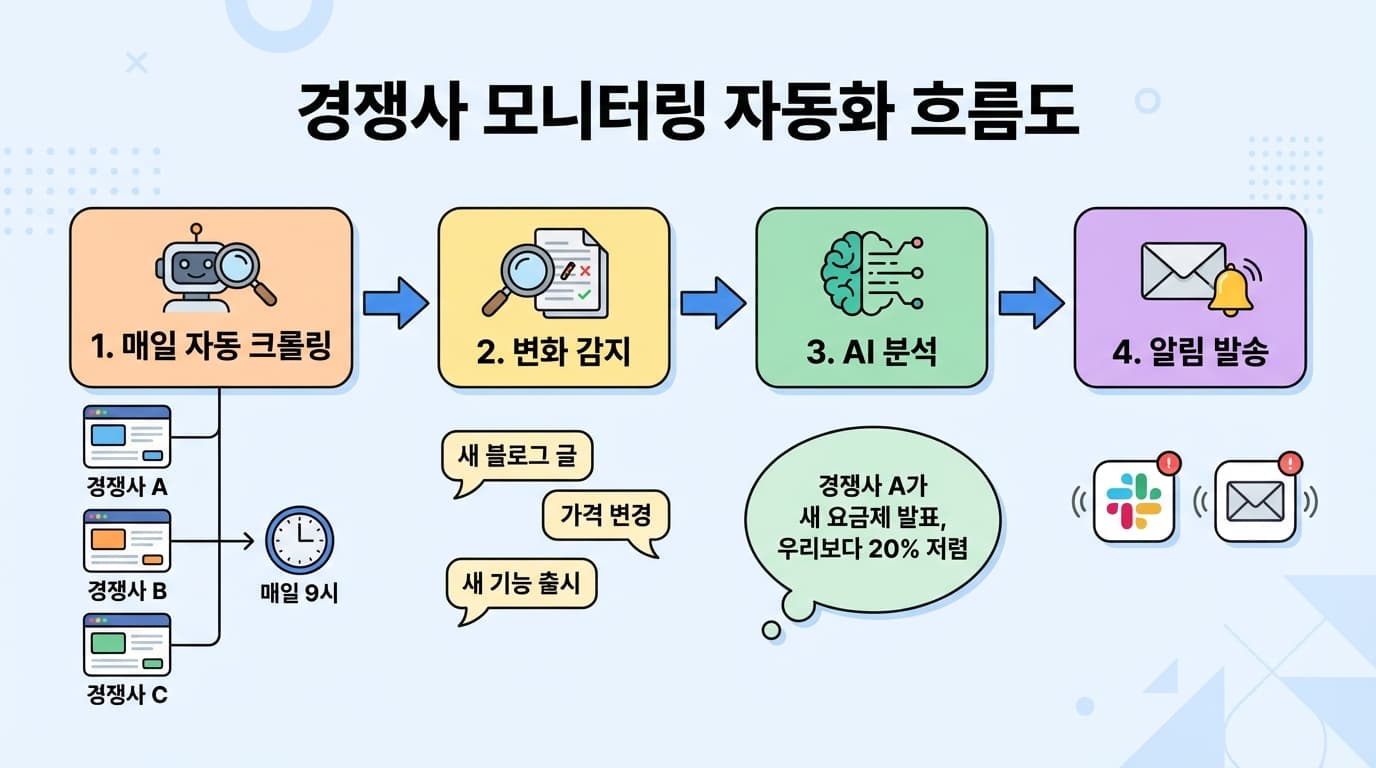
async function monitorCompetitors() {
  const competitors = [
    { name: 'CompanyA', url: 'https://companya.com/blog' },
    { name: 'CompanyB', url: 'https://companyb.com/changelog' },
  ];

  for (const comp of competitors) {
    const current = await scrape(comp.url);
    const previous = loadPrevious(comp.name); // Yesterday's crawl result

    if (current !== previous) {
      const analysis = await analyzeChanges(previous, current);
      await sendSlackNotification(comp.name, analysis);
      saveCurrent(comp.name, current);
    }
  }
}
5. Important Considerations
- Check robots.txt -- Only crawl pages where crawling is permitted
- Rate limiting -- Space out requests to avoid overloading servers
- Personal data -- Do not collect data containing personal information
- Terms of service -- Review each site's terms of service
6. Summary
| Step | Tool | Role |
|---|---|---|
| Crawling | cheerio / Playwright | Extract text from web pages |
| Analysis | Claude / Gemini API | Summarization, comparison, trends |
| Storage | Files/DB | History management |
| Alerts | Slack / Email | Notifications on detected changes |
The crawler collects the data, and AI analyzes it. You can automate the research you used to do manually every day.